Quick Answer
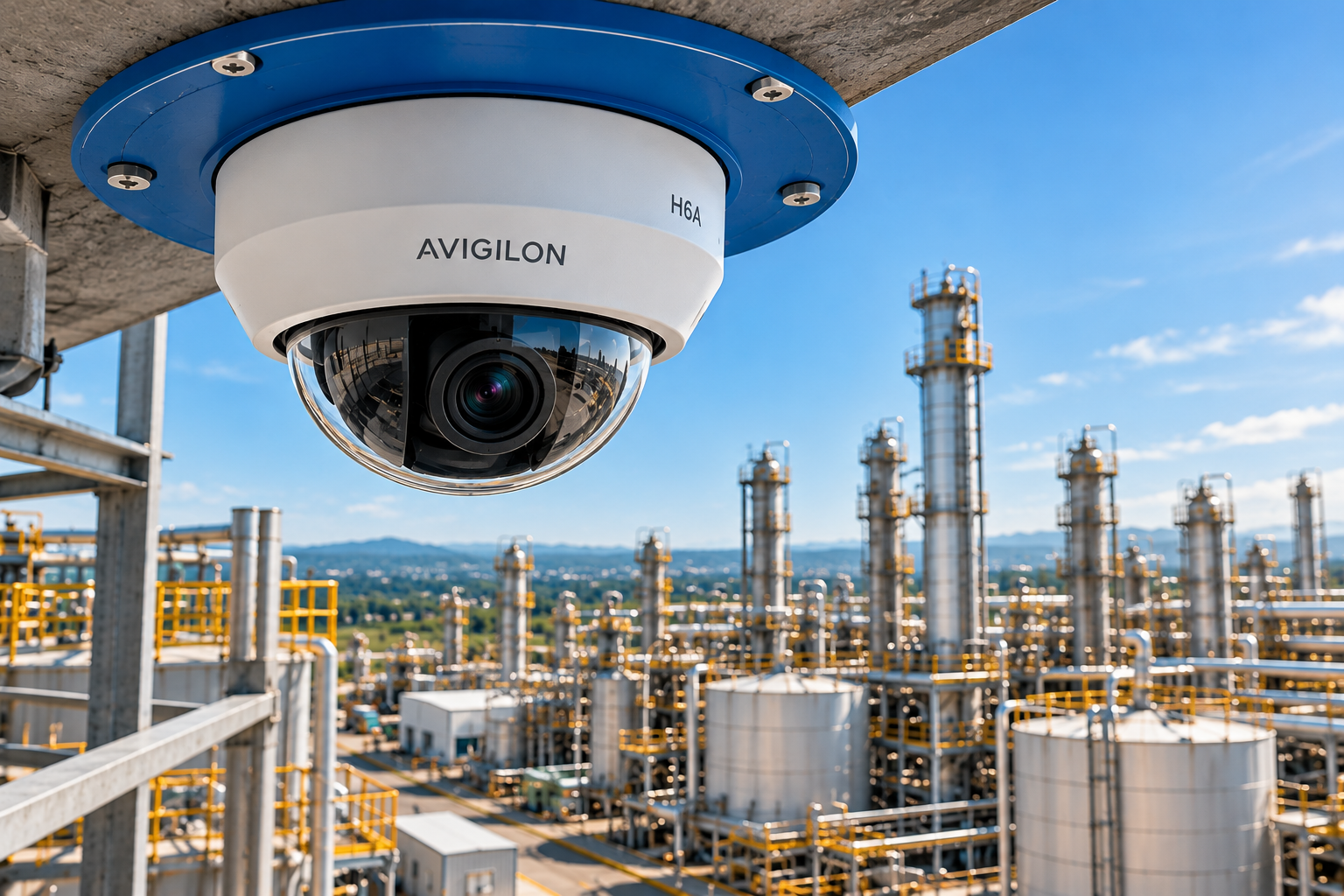
Avigilon video security is the AI-powered camera, analytics and access control portfolio from Motorola Solutions, delivered as Avigilon Unity (on-premise) and Avigilon Alta (cloud-native). Connected to a building management system (BMS) and to fire and gas detection, it turns every alarm into a verified, visual event. Operators see what triggered the alarm before anyone walks into a hazardous area.
Why Avigilon Video Security Matters for High-Risk Facilities
In high-risk sites, every second between an alarm and a decision counts. A gas alarm in a compressor room or a fire panel signal in a battery storage area cannot wait for someone to walk over and check.
Yet in most plants, cameras and the BMS still live in separate worlds. Security owns the video. Facilities owns HVAC, power and life-safety panels.
Avigilon video security closes that gap. In 2026, Motorola Solutions summed up the shift clearly: a modern security system must understand and act, not just watch.
Table of Contents
- What Is Avigilon Video Security?
- Avigilon Unity vs. Alta: Which Platform Is Right for You?
- Key Cameras for Industrial and Hazardous Areas
- 7 Proven Ways Avigilon Video Security Upgrades Your BMS
- Where Avigilon Video Security Is Specified
- Spec-Stage Considerations
- Why Source Through Blue BMS
- Frequently Asked Questions
What Is Avigilon Video Security?
Avigilon is the video security and access control brand of Motorola Solutions. Its current suite combines three acquisitions — Avigilon (2018), Openpath (2021) and Ava Security (2022) — under one brand.
Avigilon video security is built on three layers:
- AI cameras with onboard analytics that classify people and vehicles, plus audio analytics on selected models.
- Software platforms that manage video, alarms and access control: Avigilon Unity on-premise and Avigilon Alta in the cloud.
- Response tools from Motorola Solutions, such as automation playbooks, smart sensors and two-way radio.
For industrial buyers, the key point is simple. Avigilon video security does not just record incidents. It helps your team detect, verify and respond to them — alongside your fire, gas and building management systems.
Avigilon Unity vs. Alta: Which Platform Is Right for You?
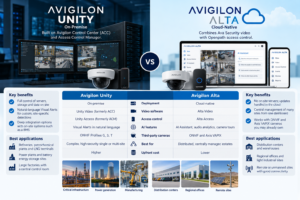
Avigilon video security comes in two platforms. Both run AI analytics and manage video and access control. However, they are deployed differently — and suit different sites.
Avigilon Unity (On-Premise)
Unity is built on Avigilon Control Center (ACC) and Access Control Manager. Motorola Solutions designs it for large multi-site operations like critical infrastructure, hospitals and manufacturing.
Pros:
- Full control of servers, storage and data on site
- Natural-language Visual Alerts for custom, site-specific detections
- Deep integration options with on-site systems such as a BMS
Cons:
- Higher upfront investment in servers and storage
- Your team or integrator manages updates and maintenance
Best applications:
- Refineries, petrochemical plants and LNG terminals
- Power plants and battery energy storage sites
- Large factories with a central control room
Avigilon Alta (Cloud-Native)
Alta combines Ava Security video with Openpath access control. It needs no infrastructure beyond cameras, controllers and readers.
Pros:
- No on-site servers; updates handled in the cloud
- Central management of many sites from one dashboard
- Works with ONVIF and Axis VAPIX cameras you may already own
Cons:
- Depends on reliable internet connectivity
- May conflict with strict data-residency policies
Best applications:
- Distribution centers and warehouses
- Regional offices and light industrial sites
- Remote or unmanned sites with good connectivity
Side-by-Side Comparison
| Feature | Avigilon Unity | Avigilon Alta |
|---|---|---|
| Deployment | On-premise | Cloud-native |
| Video software | Unity Video (formerly ACC) | Alta Video |
| Access control | Unity Access (formerly ACM) | Alta Access |
| AI features | Visual Alerts in natural language | AI Assistant, audio analytics, camera tours |
| Third-party cameras | ONVIF Profiles G, S, T | ONVIF and Axis VAPIX |
| Best for | Complex, high-security single or multi-site | Distributed, centrally managed estates |
| Upfront cost | Higher | Lower |
Key Cameras for Industrial and Hazardous Areas
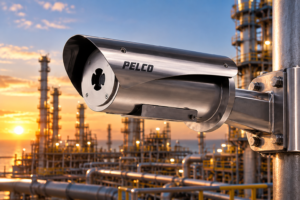
The camera decides what the platform can see. For industrial sites, the Avigilon H6 family covers general areas, while Pelco ExSite — also part of Motorola Solutions — covers classified hazardous zones.
| Camera | Platform | Resolution | Key feature | Best use |
|---|---|---|---|---|
| Avigilon H6A Dome / Bullet | Unity | 2–8 MP | AdaptAI video + audio analytics | Process areas, entrances, corridors |
| Avigilon H6X Dome / Box | Unity | Up to 8 MP | No microphone or wireless; box takes long-zoom lenses | Compliance and high-security zones |
| Avigilon H6A Fisheye | Unity | 8 or 12 MP | 360° / 180° coverage | Warehouses and open interiors |
| Avigilon H6A PanoPTZ | Avigilon (2026) | Multi-sensor | 360° panorama + PTZ tracking | Yards, tank farms, perimeters |
| Avigilon H6SL Dome / Bullet | Alta | Up to 5 MP | Cloud camera with onboard analytics | Distributed sites |
| Pelco ExSite Enhanced 2 | ONVIF | 2–6 MP, up to 30x zoom | ATEX / IECEx Ex db IIC, stainless steel | Classified hazardous areas |
| Pelco ExSite thermal (EXRE2) | ONVIF | 640×480 radiometric | Per-pixel temperature data | Overheating equipment, low visibility |
Sources: Avigilon H6A/H6X specifications, Motorola Solutions ISC West 2026 highlights, Pelco ExSite Enhanced. Figures vary by model code — always check the current datasheet.
AI Analytics on Every Avigilon Video Security Camera
AdaptAI classifies people and vehicles. In outdoor mode it identifies vehicle sub-types such as pickup trucks, large trucks, vans and buses.
The H6A also detects sounds such as screaming or breaking glass. It can blur people and vehicles with dynamic privacy masking until an investigator removes it.
Built for Classified Zones
The Pelco ExSite Enhanced 2 is purpose-built for hazardous locations with flammable gases, liquids or dust. Its 316L stainless steel housing carries ATEX and IECEx Ex db IIC T5/T6 Gb ratings, plus Class I Div 2 approvals (datasheet).
Spec Note: Avigilon H6 cameras are not explosion-proof. In Zone 1 or Division 1 areas, specify certified explosion-proof cameras such as Pelco ExSite and connect them to Avigilon Unity Video through ONVIF. Confirm which analytics remain available on third-party streams.
7 Proven Ways Avigilon Video Security Upgrades Your BMS
The BMS knows what the building is doing. Avigilon video security shows what people are doing. Together, they close the gap between an alarm and the right response.
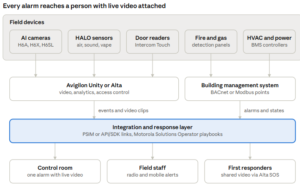
Field devices report into Avigilon or the BMS. An integration layer correlates both and sends one enriched alarm to the right people.
1. Verify Every Fire, Gas and BMS Alarm on Video
When a gas detector such as the Det-Tronics GT3000 trips, the nearest camera opens on the operator’s screen. The team sees whether people are inside before anyone enters.
The same applies to flame detectors and fire panels. Seconds of video can confirm smoke or reveal a false trigger.
2. Detect Blocked Exits and Spills with Visual Alerts
Avigilon Unity Video now offers Visual Alerts, which let users create custom, site-specific alerts in natural language.
Motorola Solutions’ own examples include a blocked fire exit or a liquid spill in a corridor. Both are facility risks, not only security risks.
3. Cover Private Areas with HALO Smart Sensors
Some spaces cannot have cameras. The HALO Smart Sensor monitors air quality, vaping, smoke, aggression and gunshot sounds without recording video.
Integrated with Avigilon Control Center, a HALO alarm opens the live feed of the nearest camera.
4. Connect Air Quality Data to HVAC
HALO 2C tracks CO₂, particulates and VOCs, and is designed to integrate with HVAC systems. That gives facilities teams live data for ventilation decisions.
5. Lock Down Access During an Incident
Unity Access lets operators view door status remotely and trigger a site-wide lockdown or global action. During a gas or fire event, a playbook can secure or release doors in seconds.
6. Automate the Response with Avigilon Video Security and Operator
Motorola Solutions Operator (formerly Inform) unifies video, access and sensor data to orchestrate incident response.
Pre-defined playbooks guide each step. Alerts can reach field staff on the two-way radios they already carry.
7. Keep One Timeline for Investigations and Compliance
Video clips, access events and BMS data sit on the same timeline. Incident reports, insurance claims and audits become faster and more accurate.
Where Avigilon Video Security Is Specified
Avigilon video security delivers the most value where one missed alarm can stop production or put lives at risk:
- Oil and gas — perimeter, wellhead and process-area monitoring, with Pelco ExSite in classified zones and Unity in the control room.
- LNG terminals — video verification of gas alarms alongside the detection layer described in our guide to gas detection for LNG terminals.
- Battery energy storage (BESS) — off-gas and temperature alarms trigger video checks and access lockouts, supporting the strategy in our NFPA 855 (2026) off-gas detection article.
- Data centers — cooling and power alarms from the BMS paired with live views of the hall and access logs.
- Manufacturing — Visual Alerts for blocked exits, spills and restricted-area entry.
- Warehouses and logistics — after-hours intrusion detection, license plate recognition at gates and cold-chain door alarms with video.
- Hospitals and campuses — HALO sensors in privacy areas and air-quality data for HVAC.
Spec-Stage Considerations
A few decisions are cheaper to make before Avigilon video security goes on the BOM than after commissioning.
Spec Note — Map alarms to cameras first. List every BMS, fire, gas and access alarm that should open a camera, and the camera covering each zone. This map drives camera placement and licensing.
Spec Note — Confirm the integration path in writing. Alarms can reach Avigilon through a certified connector such as Advancis WinGuard, a PSIM, Avigilon’s APIs and SDKs, or hard-wired relay outputs. Each option changes the wiring and the budget.
Spec Note — Separate hazardous and safe areas. Use certified explosion-proof cameras in classified zones and Avigilon H6 cameras elsewhere.
Spec Note — Choose Unity or Alta per site. A single company can run Unity at a refinery and Alta at its regional warehouses.
Spec Note — Harden the network. Require 802.1X, signed firmware and segmented VLANs for cameras and BMS controllers. The H6 line includes secure boot and an onboard FIPS 140-2 Level 3 TPM.
Spec Note — Write the playbooks. For each alarm type, define who is notified, on which device, and what they confirm before acting.
Why Source Through Blue BMS
Avigilon video security delivers its full value only when it works with your fire, gas and building systems. That is exactly where Blue BMS operates.
Benefits of Working with Blue BMS
- One partner for every layer: fire detection, gas detection, fire suppression, electronic security and BMS.
- Specialized support: we help you select cameras, sensors and platforms for each risk zone.
- Global reach: headquarters in Weston, Florida, and a European hub in Portugal.
How to Implement Avigilon Video Security in Your Facility
- Risk assessment: identify critical zones, hazardous-area classifications and the alarms that need video verification.
- Engineering design: choose Unity or Alta, place cameras and sensors, and define the integration with your BMS.
- Procurement and commissioning: source genuine equipment through a trusted supplier like Blue BMS and test every alarm-to-camera link before handover.
Frequently Asked Questions
What is Avigilon video security?
Avigilon video security is Motorola Solutions’ portfolio of AI cameras, video management and access control. It is delivered as Avigilon Unity (on-premise) and Avigilon Alta (cloud-native).
Can Avigilon video security integrate with a building management system?
Yes. Integration usually runs through the video platform, using a certified connector, a PSIM, APIs and SDKs, or relay inputs. The right method depends on your BMS vendor.
What is the difference between Avigilon Unity and Avigilon Alta?
Unity runs on servers at your site and suits complex, high-security facilities. Alta runs in the cloud and suits distributed sites managed from one dashboard.
Are Avigilon cameras explosion-proof?
No. For Zone 1 or Division 1 areas, specify certified explosion-proof cameras such as Pelco ExSite Enhanced 2, which carries ATEX and IECEx Ex db IIC ratings.
Can I keep my existing cameras?
Often, yes. Unity Video supports ONVIF Profiles G, S and T, and Alta Video supports ONVIF and Axis VAPIX cameras. Some analytics require Avigilon cameras.
Is Avigilon part of Motorola Solutions?
Yes. Motorola Solutions acquired Avigilon in 2018. Avigilon is now its video security and access control brand.
How does Avigilon video security reduce false alarms?
AI analytics classify people and vehicles instead of reacting to any pixel change. Automation software such as Motorola Solutions Operator then triages alerts before they reach an operator.
Talk to Blue BMS About Avigilon Video Security
Cameras that only record and building systems that only report are no longer enough for high-risk facilities. Avigilon video security, connected to your BMS and to fire and gas detection, gives your team one clear view of what is happening — and what to do next.
If you are planning a new site or upgrading an existing one, our team can help you choose between Unity and Alta, specify cameras for every zone and map your alarm integrations.